


How Accounting Firms Can Automate Client Management, Billing & Document Management
Accounting firms manage more than numbers. Every day, teams handle client communication, invoices, payment follow-ups, financial documents, approvals, deadlines, and sensitive business information. When these activities are managed through spreadsheets, emails, shared folders, and manual reminders, even a growing client base can quickly become difficult to manage.
A CRM Software for Accounting Firms can centralize client information, communication, follow-ups, and task management, while automation can reduce repetitive administrative work. When combined with billing workflows and structured document management, accounting firms can create a more organized and scalable client management process.
Instead of spending valuable time searching for documents, checking payment status, or following up manually, teams can automate routine processes and focus more on accounting, advisory, and client relationships.

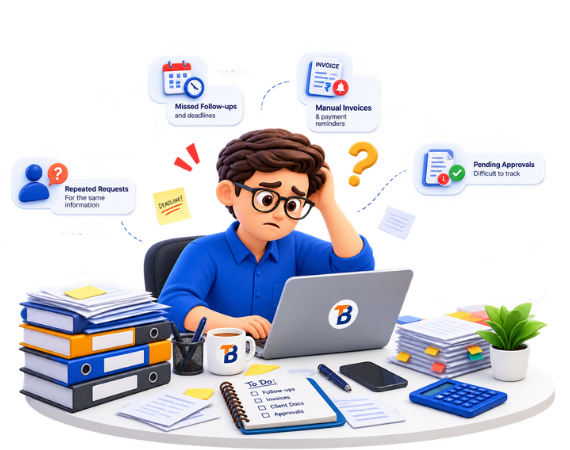
Why Accounting Firms Struggle With Manual Client Management?
Managing a few clients manually may seem manageable, but as the client base grows, scattered processes create unnecessary workload.
The biggest challenges include:
- Client information stored across different systems
- Missed follow-ups and deadlines
- Manual invoice generation and payment reminders
- Documents scattered across emails and folders
- Repeated requests for the same client information
- Difficulty tracking pending approvals
- No centralized view of client activity
- Limited visibility into team workload
- Time-consuming administrative tasks
What Does Automation Mean for Accounting Firms?
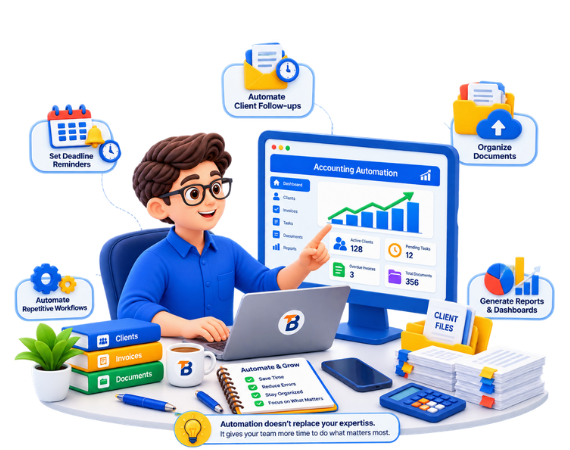
Automation means using software to handle repetitive and rule-based activities with minimal manual intervention.
For an accounting firm, this can include automatically assigning client tasks, sending reminders, generating billing notifications, organizing documents, updating client records, and notifying team members about pending actions.
A well-designed system can help accounting firms:
- Centralize client information
- Automate client follow-ups
- Track billing and payment status
- Organize documents
- Assign tasks to employees
- Set deadline reminders
- Automate repetitive workflows
- Monitor client activity
- Generate reports and dashboards

The Core Steps at a Glance
Client Management:
Client Communication:
Billing & Payment Management:
Document Management:
What Should an Accounting Firm Automation System Include?
A successful automation system connects client management, billing, document handling, task management, and communication into one unified workflow rather than treating them as separate processes. It typically includes features such as client and contact management, automated follow-ups, task and deadline tracking, invoice and billing management, payment status monitoring, document management with submission reminders, email notifications, communication history, role-based access, reports and dashboards, workflow automation, and third-party integrations. For firms with unique operational needs, Custom Software Development offers a more flexible solution by building workflows and integrations around the firm’s actual processes, while also ensuring scalability and seamless integration with existing CRM and ERP systems.
How CRM Helps Accounting Firms Manage Client Relationships?
How AI & Automation Can Reduce Repetitive Accounting Work?
Beyond traditional workflow automation, AI can help accounting firms reduce repetitive administrative work and improve day-to-day efficiency. AI-powered workflows can automatically classify documents, extract key information, route client queries, trigger workflow actions, organize business data, send automated notifications, and handle other repetitive operational tasks. The objective is not to replace accounting professionals, but to automate routine processes so teams can focus on higher-value advisory and financial work. Custom AI and automation solutions can also be integrated with existing business systems to create smarter, more efficient operations.
Why Accounting Firms Should Connect Their Systems?
One of the biggest challenges in accounting firms is disconnected information across different tools. Client data, billing, documents, tasks, and communication are often managed separately, leading to manual work and inefficiency. An integrated software system connects these processes into one seamless workflow—from client onboarding and document collection to invoicing, payment reminders, and status updates.
When Does Custom Software Make Sense?
Not every accounting firm needs a fully custom platform. Standard CRM or accounting software works well for simple workflows, but custom software becomes valuable when businesses require complex client management, custom billing, document automation, approvals, multiple user roles, and seamless CRM or ERP integrations. The biggest advantage is that the software is built around the firm’s existing processes, making operations more efficient without changing how teams work.
How to Measure Automation Success?
Automation should be measured by business results, not just the number of workflows. Accounting firms should track key metrics such as client response time, document collection, invoice and payment processing, overdue invoices, follow-up completion, onboarding time, employee productivity, and client retention. These insights help measure the real impact of automation on efficiency and client service.
Final Thoughts
Accounting firms don’t need more disconnected tools. They need connected workflows that make client management, billing, documents, and communication easier to manage.
By combining CRM, billing workflows, document management, task automation, and integrated business systems, accounting firms can reduce repetitive work, improve visibility, and provide a more consistent client experience.
The goal of automation isn’t simply to do more with technology.
It’s to give accounting teams more time to focus on the work that requires their expertise.
Ready to Automate Your Accounting Firm's Workflows?
BreezewayTech builds custom CRM, ERP, and software solutions that help businesses automate client management, billing workflows, document processes, reporting, and day-to-day operations.
Build a system around the way your accounting firm actually works.